PC Requirements Checker Tool
Use this PC system requirements checker to instantly test if your computer can run any game. Compare your CPU, GPU, RAM, and OS with official minimum and recommended requirements in seconds.
The results are shown automatically as a pass or fail. All PC specification fields are required for an accurate result. Windows 10 is set as the default operating system, but many games also run on Windows 7, Windows 8, and Windows 11.
This Can You Run It system requirements checker is designed to give you a reliable indication of game performance. Always do your own research before purchasing a game.
Can’t find the game you’re looking for in the system requirements checker? Scroll down to explore alternative ways to check game compatibility, or use the My Computer Specs tool to view your PC hardware details.
🔥Looking for PC games? Browse them from NightPlayHub or AimHaven or SteamOnFire.
Start your test below 👇
Can You Run It Requirements Tool
Your PC Specs & Details
How This PC Requirements Checker Works
Select a game and enter your PC specifications to compare your system against official requirements. The tool analyzes your hardware and shows whether your PC meets minimum or recommended specs for smooth gameplay.
Use the Can You Run It checker above to test thousands of PC games and instantly see if your computer meets the official system requirements. Meeting the minimum or recommended system requirements does not guarantee good performance. This tool provides a quick compatibility check, not a performance benchmark.
🔥Looking for the official system requirements, recommended PC specs, and best graphics settings for upcoming games? Check out RequirementsForPC for complete hardware overviews and performance guides.
What Games Can I Run
Wondering what games your PC can run? Use the Can You Run It tool to compare your computer’s hardware with official PC game system requirements. Simply select a game to instantly check whether your CPU, GPU, RAM, and operating system meet the minimum or recommended specifications. Fast, free, and accurate—so you know before you download or buy.
Not sure what your PC specs are? Before running a test, you can easily check your computer’s hardware details. Below, you’ll find the four easiest ways to check your PC specs for free using CanIRunTheGame, so you can get accurate results from the system requirements checker.
What Are My PC Specs? How To Check:
Method 1:
- Open the Start Menu or tap the Windows key on your keyboard.
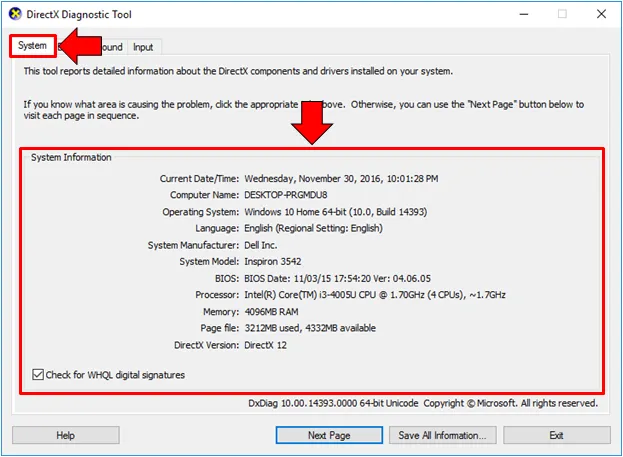
- Type in ‘dxdiag’ to search for the DirectX Diagnostic Tool.
- Click on the “dxdiag” command option or press Enter to open the DirectX Diagnostic Tool.
- Navigate to the “System” tab to see your Windows version (“Operating System”), CPU (“Processor”), and RAM (“Memory”).
- Use the ”Display” tab to find your current Driver settings.
- All your computers specs can be found inside the DirectX Diagnostic Tool.
- Compare the Minimum game requirements vs your Computer specs to see if you are able to run the game.
Method 2:
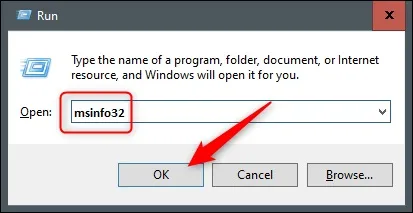
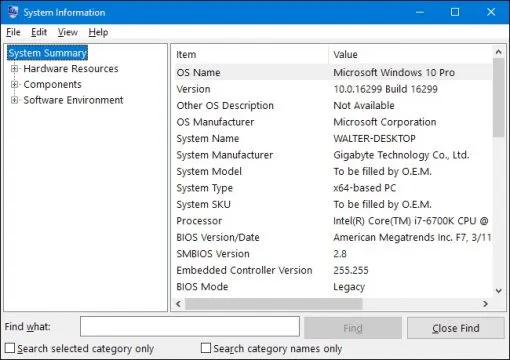
Hit ‘Windows key+R’ to open the Run box. Type “msinfo32” into the “Open” field, and then hit Enter. The System Information window opens, showing your pc specs and all kinds of information.
Method 3:
Hit the ‘Start’ button and type “system information” into the search box, and select the result. The System Information window opens, showing your pc specs and all kinds of information.
Method 4:
Use free, easy-to-use tools to detect your Computer Specs automaticly:
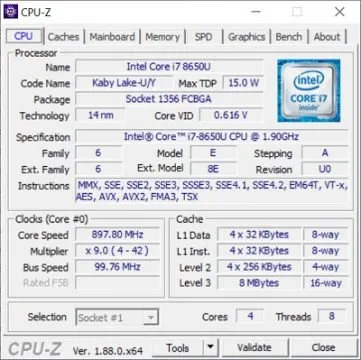
- CPU-Z: A free lightweight system utility that gathers information on some of the main devices of your system. Get CPU-Z Here.
This is how CPU-Z looks like:
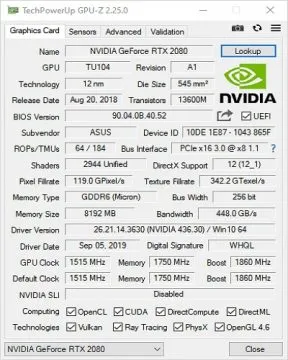
- GPU-Z: A free lightweight system utility designed to provide vital information about your video card and graphics processor. Get GPU-Z Here.
This is how GPU-Z looks like:
Check PC Game System Requirements
Checking PC game system requirements is easy once you know your computer specs. On Windows 7, 8, 10, and 11, you can use one of the four methods above to find your CPU, GPU, RAM, storage, and operating system. After identifying your PC specs, you can accurately compare them with a game’s minimum and recommended system requirements.
By analyzing your hardware and generating a clear compatibility result, the Can You Run It tool helps you save time, avoid frustration, and prevent performance issues before downloading or buying a game.
Can My PC Run It?
Want to know which games your PC can run? Browse the most popular PC games system requirements to see what titles your computer can handle. You can also check Steam games directly using the Can You Run It tool to test your favorite games in seconds.
Can I Run It – Missing Games or Hardware?
Some games, drivers, or processors may not yet be available in the free system requirements checker. If you can’t find a game or think a Pass or Fail result is incorrect, feel free to contact us so we can review and update the tool. Your feedback helps us improve accuracy and keep the system requirements database up to date.
PC Game Performance Test
The Can You Run It performance test compares your PC’s hardware and software specifications with official game requirements. By checking both minimum and recommended specs, the tool helps you avoid crashes, poor performance, and compatibility issues before installing or purchasing PC games. This makes it especially useful for gamers who want reliable results before playing.
Check Your FPS Instantly
Curious how many frames per second your PC can achieve? Try our FPS Checker & Calculator Tool for a quick, browser-based estimate based on your CPU, GPU, and resolution—no downloads required.
Frequently Asked Questions About PC System Requirements
How accurate is this PC requirements checker tool?
This PC system requirements checker provides a reliable indication of whether your PC meets the minimum and recommended game requirements. However, actual in-game performance may vary depending on drivers, background applications, and hardware conditions.
What do minimum system requirements mean?
Minimum requirements indicate the lowest hardware specifications needed to run a game. Meeting the minimum does not always guarantee smooth performance, but it ensures the game can launch and run.
What are recommended system requirements?
Recommended system requirements represent the hardware needed for a smoother and more optimal gaming experience. Meeting recommended specs usually results in better performance and higher FPS.
Why does my PC meet minimum requirements but still run games poorly?
Minimum specifications only guarantee basic functionality. Factors such as resolution, graphics settings, CPU bottlenecks, and background processes can significantly impact performance.
Do I need to enter all PC specs for accurate results?
Yes. All required fields, including CPU, GPU, RAM, and operating system, must be completed to generate an accurate compatibility result.
Does this PC requirements checker support Windows 10 and Windows 11?
Yes. The tool supports modern operating systems including Windows 10 and Windows 11, as well as compatibility checks for older versions where applicable.
What should I do if a game is not listed in the system requirements checker?
If a specific game is not available, you can explore alternative compatibility checks or use hardware analysis tools to evaluate your system’s performance.
Can I use this tool to check Steam games?
Yes. This PC system requirements checker can be used to evaluate most PC and Steam games based on their published minimum and recommended specifications.
Can this tool estimate FPS performance?
This tool primarily checks compatibility based on system requirements. FPS results can vary depending on graphics settings, resolution, and hardware optimization.
Use the Can You Run It tool above to test your PC against any game’s system requirements in seconds. Want a full explanation of how PC compatibility works? Check out our detailed guide: Can My PC Run Any Game Guide.