Check the official minimum and recommended system requirements for Jurassic World Evolution 3 below. Find out more about the PC hardware required to run the game, including the recommended processor, graphics card, RAM and storage.
Can I Run Jurassic World Evolution 3
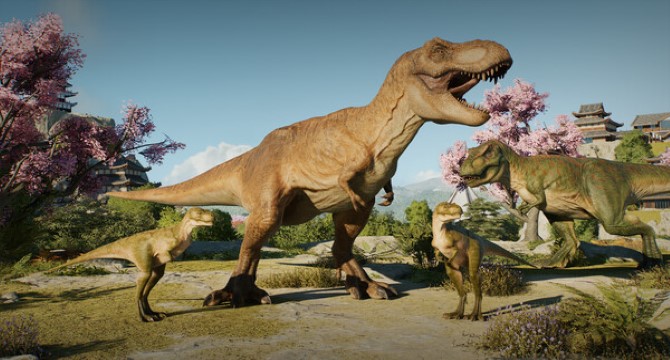
Jurassic World Evolution 3 – the next chapter in the award-winning franchise – puts you in charge of designing, building, and managing your very own Jurassic World. Help life find a way as you synthesize, breed, and nurture over 80 awe-inspiring prehistoric species. For the first time, 75 of these species can raise families across generations. Care for your dinosaurs from playful juveniles to majestic adults, each with distinct male, female, and juvenile variants.
Manage their unique needs and create thriving environments where they can grow, interact, and pass on their genes. Design immersive habitats that let your dinosaurs flourish, and wow your guests with thrilling new attractions. From the up-close Dinosaur Encounter to the sky-high Balloon Tour, there’s something to amaze every visitor. But be ready—when nature runs wild, you’ll need to step in to restore balance and safety. Observe brand-new behaviours as creatures interact with their world like never before. Semi-aquatic dinosaurs dive into deep waters, while pterosaurs now explore land. Tailor your park using powerful new creative tools, including modular scenery customisation and advanced terrain editing, offering unprecedented freedom in building your ultimate dinosaur sanctuary.
Build naturalistic enclosures with steep slopes, lush scenery, and dynamic environments. Then take your creativity global—thanks to Frontier Workshop, you can share your parks, buildings, and enclosures across platforms. Explore the best community creations or upload your own for others to enjoy. Whether you’re a seasoned park manager or a first-time creator, Jurassic World Evolution 3 is your ultimate sandbox to shape prehistory—one dinosaur at a time.

Jurassic World Evolution 3 Minimum System Requirements
- OS: Windows 10 (64-bit)
- Processor: Intel i5-6600K / AMD Ryzen 5 2600
- Memory: 16 GB RAM
- Graphics: NVIDIA GeForce GTX 1060 (6GB VRAM) / AMD Radeon RX 5600XT (6GB VRAM) / Intel Arc A750 (8GB VRAM)
- DirectX: Version 12
- Storage: 25 GB available space
Jurassic World Evolution 3 Recommended System Requirements
- OS: Windows 10 (64-bit)
- Processor: Intel i7-10700K / AMD Ryzen 7 5800(H)
- Memory: 16 GB RAM
- Graphics: NVIDIA GeForce RTX 2070 Super (8GB VRAM) / AMD Radeon RX 6700 XT (12GB VRAM) / Intel Arc B580 (12GB VRAM)
- DirectX: Version 12
- Storage: 25 GB available space
Jurassic World Evolution 3 PC Requirements – CPU, GPU, RAM and Storage (Minimum and Recommended):

Jurassic World Evolution 3 System requirements
AMD Ryzen 5 2600
AMD Ryzen 7 5800H
AMD Radeon RX 5600 XT
AMD Radeon RX 6700 XT
Can You Run It
Check instantly if your PC can run Jurassic World Evolution 3 requirements with free, easy-to-use detection tools or enter your system specifications manually. Click the Orange button below to start with the requirements test.

Can Your PC Run This Game Smoothly?
This game requires a balanced PC setup to run smoothly. If your system only meets the minimum requirements, you may experience lower frame rates and need to reduce graphics settings.
For the best performance, a modern graphics card, sufficient RAM, and a strong processor are recommended. More demanding games with open-world environments or advanced effects can put additional strain on your hardware.
Want to know if your PC can run this game? Use our PC System Requirements Checker to instantly compare your CPU, GPU, RAM, and storage with the official game requirements.
Performance Tips for Better FPS
To improve performance, lowering graphics settings such as shadows, textures, and anti-aliasing can significantly increase FPS. Closing background applications can also help free up system resources.
Upgrading your GPU or adding more RAM will provide the biggest performance boost, especially for newer PC games.
Jurassic World Evolution 3 Steam
Jurassic World Evolution 3 Steam Page: https://store.steampowered.com/app/2958130/Jurassic_World_Evolution_3/
Jurassic World Evolution 3 PC Specs
To ensure the best performance when running the game on PC, always install the latest video card drivers for your system. Visit our Driver Updates section for step-by-step help with NVIDIA and AMD graphics cards. Before playing, compare your PC specs with the minimum and recommended requirements shown above. Meeting the minimum requirements ensures the game runs properly, while stronger hardware allows higher graphics settings, smoother FPS, and better overall performance. Use the “Can You Run It” tool to instantly check if your PC can run it and see what upgrades may improve performance.
Jurassic World Evolution 3 Details
Gameplay Screenshot